Models & Services
Which AI model powers your agents, and how you pay for it.
What It Does
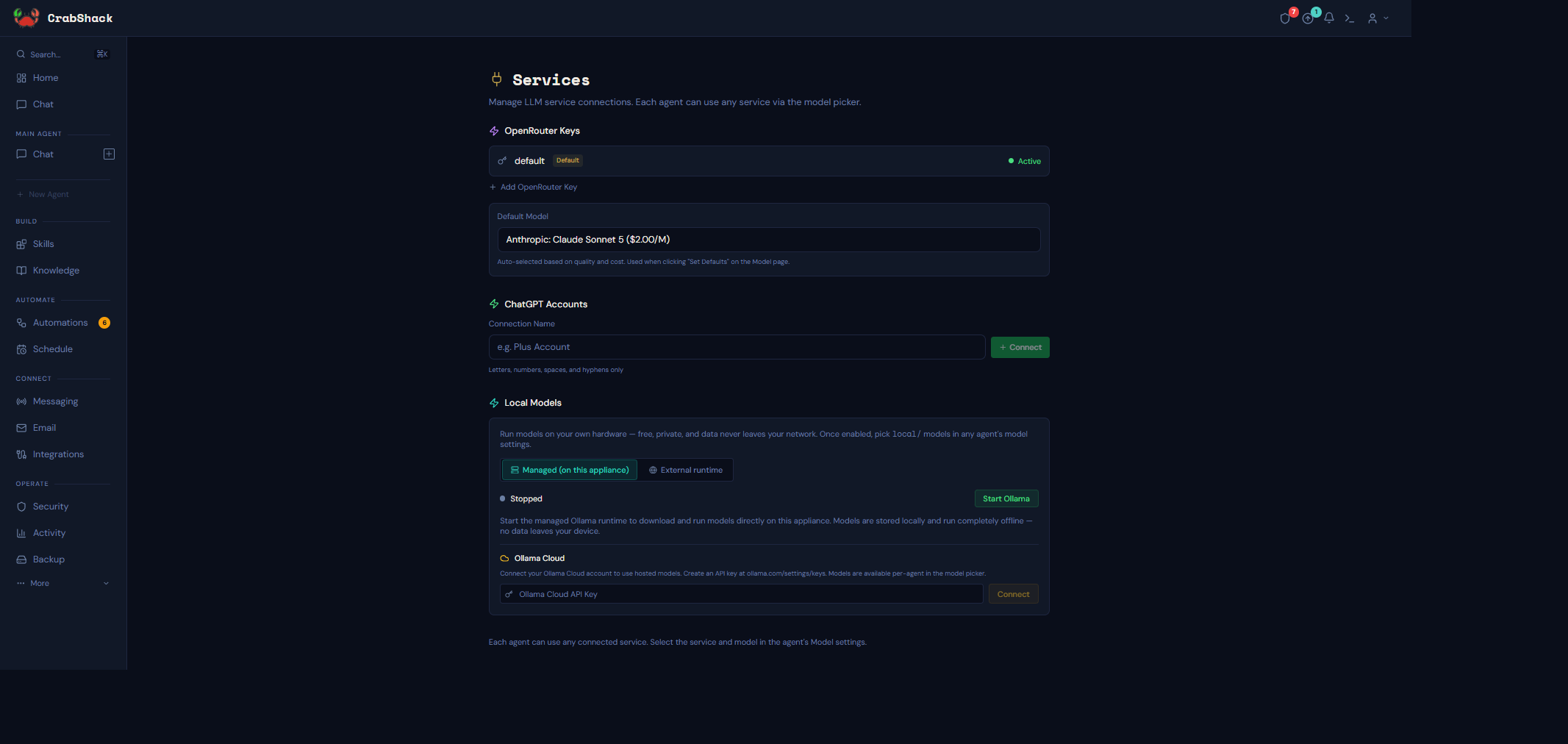
Every agent has a "brain" — the AI model it uses to understand messages and decide what to do. CrabShack doesn't lock you into one model or one provider. From Services (connecting an account) and each agent's Model page (choosing what to actually use), you control exactly which model handles which job, and where your money — if any — goes.
Why It Matters
Different jobs call for different tradeoffs. A quick WhatsApp reply doesn't need the same model as a complex multi-step booking. Some businesses want the cheapest option that works; others care more about privacy than cost. CrabShack lets you mix and match instead of forcing one choice on everything.
Your Options
| Option | How it works | Cost | Best for |
|---|---|---|---|
| OpenRouter (hosted) | Add an API key; choose from hundreds of models (Claude, GPT, Gemini, Llama, Mistral, and more) | Pay only for what you use | Most businesses — flexibility and the widest model choice |
| ChatGPT Plus/Pro (Codex) | Sign in with your existing ChatGPT subscription | Flat monthly rate you already pay — no extra per-message cost | Businesses that already have a ChatGPT Plus or Pro plan |
| Ollama (Local) | CrabShack runs the model directly on your instance | Free to run — no per-message cost | Privacy-sensitive work, predictable workloads, or a free fallback |
| Ollama Cloud | Ollama's own hosted service; add an API key | Pay Ollama directly | Open-source models without running them on your own hardware |
A retail shop sets Balanced (a hosted Claude model) as their main agent's default during onboarding — good enough for order questions and easy on the wallet. Later, the owner starts managed Ollama on their instance, downloads a small local model that fits their VM's memory, and sets it as a free fallback so the agent can still reply to simple questions if the hosted service is ever slow or unavailable. Because the owner already pays for ChatGPT Plus personally, they also connect that account so it's available as an option for a specific agent.
What's in This Section
- Ollama (Local) — running models on your own hardware, with hardware guidance, plus using a remote Ollama server
- Ollama Cloud — Ollama's hosted model service
- ChatGPT and OpenRouter — connecting subscription and pay-as-you-go accounts
- Choosing Models Per Purpose — Primary, Subagent, Heartbeat, Image, and Tasks models, plus fallback chains
- Troubleshooting — common connection and performance problems
Related
- Getting Started — the onboarding wizard's "Choose a model" step
- Agents — creating and configuring agents